🛡️ Backup Master Pro
WordPress Backup Solutions

WordPress Backup Complete Guide
Platform: WordPress CMS
Users: 43% of all websites worldwide
Backup Methods: Plugins, Manual, Hosting, Server-level
Why WordPress Backups Are Critical
WordPress powers over 43% of all websites on the internet, making it the world's most popular content management system. However, this popularity also makes WordPress sites prime targets for hackers, malware, and attacks. Regular backups are your insurance policy against:
- Hacking & Malware: WordPress sites face 90,000+ attacks per minute globally
- Plugin Conflicts: Updates can break your site unexpectedly
- Human Error: Accidental deletions, bad edits, or configuration mistakes
- Server Failures: Hosting provider issues, hardware failures, or data corruption
- Database Corruption: MySQL errors can destroy your content and settings
WordPress Backup Workflow
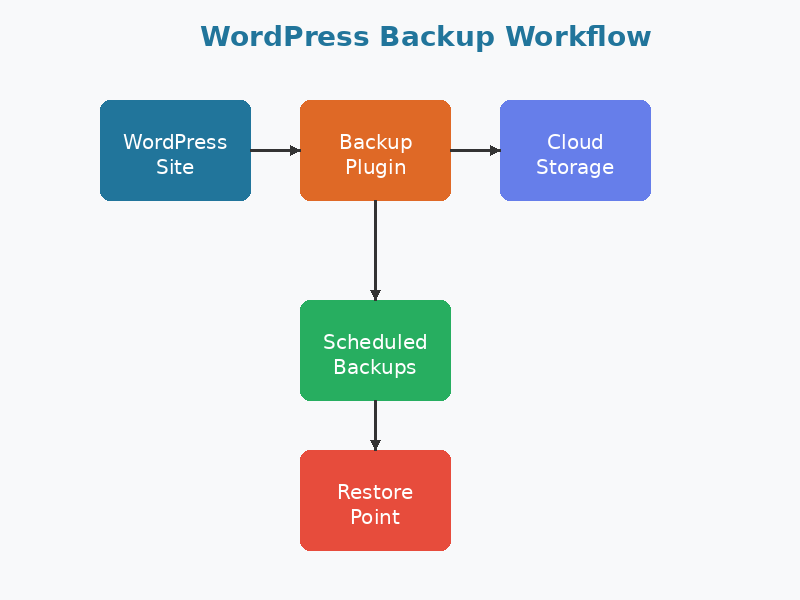
A complete WordPress backup includes:
- WordPress Core Files: wp-admin, wp-includes, wp-config.php
- Themes: All theme files in wp-content/themes/
- Plugins: All plugin files in wp-content/plugins/
- Uploads: Images, videos, PDFs in wp-content/uploads/
- Database: All posts, pages, comments, users, and settings in MySQL
WordPress Backup Plugin Comparison
Comprehensive comparison of the top WordPress backup plugins available in 2026:
| Plugin | Free Version | Premium Price | Active Installs | Key Features | Best For |
|---|---|---|---|---|---|
 UpdraftPlus |
✅ Yes Full backups Manual/scheduled |
$70/year 1 site $95 (2 sites) $195 (unlimited) |
3+ million |
• Cloud storage integration • Incremental backups • Database encryption • Migration tools • Multisite support |
All-around best choice Great free version |
 BackupBuddy |
❌ No Premium only |
$80/year 1 site $127 (10 sites) $199 (unlimited) |
500,000+ |
• Stash cloud storage (10GB) • Real-time backup • Malware scan • 1TB iThemes Sync storage • White-label options |
Agencies & developers Multiple sites |
 Duplicator |
✅ Yes Manual backups Migration only |
$50/year 1 site $150 (3 sites) $250 (unlimited) |
1+ million |
• Site migration focus • Drag & drop installer • Cloud storage • Scheduled backups (Pro) • Large site support |
Migrations & cloning Developers |
 BlogVault |
❌ No 7-day trial |
$89/year 1 site $149 (5 sites) $249 (20 sites) |
400,000+ |
• Independent server backups • 90-day backup history • Staging environment • Incremental backups • Zero server load |
High-traffic sites E-commerce |
 WPvivid |
✅ Yes Full features No limits |
$79/year 3 sites $99 (5 sites) $159 (20 sites) |
100,000+ |
• Cloud storage integration • Unused images cleanup • Migration tools • Custom backup schedules • Staging site |
Budget-conscious users Great free option |
 BackWPup |
✅ Yes Full backups Cloud storage |
$75/year 1 site $99 (3 sites) $199 (10 sites) |
600,000+ |
• Multiple backup jobs • Database optimization • XML export • Dropbox/S3/FTP support • Encryption |
Power users Custom workflows |
Feature Comparison Matrix
🔄 Automated Backups
All plugins support scheduled automatic backups. Premium versions offer more flexible scheduling (hourly, every 4 hours, etc.).
☁️ Cloud Storage
UpdraftPlus, Duplicator, WPvivid: Support Dropbox, Google Drive, S3, etc. BlogVault uses proprietary cloud.
🔐 Encryption
UpdraftPlus, BackupBuddy: Database encryption. BackWPup offers file encryption. Essential for compliance.
📊 Incremental Backups
UpdraftPlus Premium, BlogVault: Only backup changed files, saving storage and bandwidth.
🚀 Migration Tools
Duplicator, UpdraftPlus: Built-in migration. Duplicator is migration-focused with installer packages.
🎯 Staging Sites
BlogVault, WPvivid Pro: Create staging environments for testing updates safely.
🛡️ Security Scanning
BackupBuddy: Includes malware scanning. BlogVault offers security monitoring add-ons.
⚡ Performance
BlogVault: Independent server = zero site load. Others use your server resources during backups.
🌐 Multisite Support
UpdraftPlus Premium, BackupBuddy: Full WordPress multisite network support.
💾 Backup Size Limits
BlogVault, BackupBuddy: Handle large sites (10GB+) better. Free plugins may struggle with large databases.
🔧 Restoration
All support one-click restore. Duplicator's installer packages work even if WordPress is broken.
📞 Support
Premium only: BackupBuddy & BlogVault offer priority support. Free plugins rely on forums.
Pricing Summary & Recommendations
💡 Our Recommendations
🏆 Best Overall: UpdraftPlus
Free version is excellent for most users. Premium ($70/year) adds incremental backups, migration, and premium storage options. Perfect balance of features and price.
💰 Best Free Option: WPvivid
No limitations on free version. Full cloud storage support, cleanup tools, and migration included at no cost. Premium adds staging and advanced features.
🚀 Best for E-commerce: BlogVault
Independent server backups mean zero performance impact. Real-time backups protect transaction data. 90-day history perfect for rolling back issues. Worth the $89/year premium.
🔄 Best for Migrations: Duplicator
Purpose-built for site migrations and cloning. Free version handles migrations perfectly. Pro ($50/year) adds scheduled backups and cloud storage.
WordPress Backup Best Practices
- Backup Before Updates: Always backup before updating WordPress core, themes, or plugins
- 3-2-1 Rule: Keep 3 copies (1 live + 2 backups), on 2 different media types, with 1 off-site
- Automated Schedule: Daily for active sites, weekly for static sites
- Test Restores: Perform test restores quarterly to ensure backups work
- Off-Site Storage: Store backups on cloud services (Dropbox, S3, Google Drive), not just your hosting server
- Database Backups: Ensure database is backed up separately from files
- Retention Period: Keep 30 days of daily backups, 12 months of monthly backups
- Pre-Migration: Create backup before migrating to new host or domain
- Monitor Backup Jobs: Check that backups complete successfully (email notifications)
- Document Process: Write down restore procedures for emergencies
Common Backup Scenarios
Scenario 1: Site Got Hacked
- Take site offline or enable maintenance mode
- Identify clean backup from before infection (check 3-7 days back)
- Restore WordPress core files and database from clean backup
- Update all plugins, themes, and WordPress to latest versions
- Change all passwords (WordPress, database, hosting, FTP)
- Install security plugin (Wordfence, Sucuri) and run full scan
- Monitor site closely for 2-4 weeks
Scenario 2: Plugin Update Broke Site
- Don't panic - this is common and easily fixed
- Access backup plugin from WordPress admin (if accessible)
- Restore from backup taken immediately before update
- If admin inaccessible, use cPanel/hosting panel to restore files
- Deactivate problematic plugin via FTP (rename plugin folder)
- Contact plugin developer or find alternative plugin
- Test updates on staging site before applying to live site in future
Scenario 3: Accidental Content Deletion
- Check WordPress trash first (posts, pages, media)
- If permanently deleted, access backup plugin
- Download backup file containing deleted content
- Extract database from backup archive
- Use PHPMyAdmin to locate specific post/page in SQL file
- Import just that content, or use partial restore feature if available
- Verify content is restored correctly on live site
Integration with Server-Level Backups
WordPress backup plugins should complement, not replace, server-level backups:
- cPanel Backups: Full account backups include database and files but may be infrequent
- JetBackup: If your host offers JetBackup, configure daily backups in addition to plugin backups
- Hosting Backups: Many hosts offer automatic backups - verify retention period and restoration process
- Redundancy: Multiple backup methods provide fail-safe protection
WordPress.com vs Self-Hosted WordPress
WordPress.com (hosted): Automatic backups included in all paid plans. Real-time backups on Business and higher. Cannot use plugins - backups managed by WordPress.com.
Self-Hosted WordPress.org: You're responsible for backups. Use plugins discussed above. More control but more responsibility.